📱 Android enters its Gemini Intelligence era
The company just introduced a new line of AI-native Googlebooks, a new Gemini Intelligence system across devices, a Gemini-infused mouse cursor, and more
Hi, I am Ara. Welcome to AI with Ara, a fast-growing community for curious minds, builders, and working professionals. Join 35,000+ leaders, marketers, and creators who want practical AI help they can actually use.
Every issue brings the latest tools, trends, and simple tutorials, plus real workflows you can copy in minutes. No jargon. No overwhelm. Just clear steps that help you learn faster, work smarter, and stay ahead.
Sign up for free. Get smarter. Get confident. Grow with AI.

Today in AI with Ara
New Googlebooks And Gemini Intelligence For Android
Poppy Debuts a Proactive AI Assistant to Help Organize your Digital Life
Thinking Machines Lab Introduces Real-Time AI Interaction Models
Gartner Releases AI Techniques Heat Map For Enterprise Use Cases
Everything Else in AI Today
New & Trending AI tools
Prompt of the Day
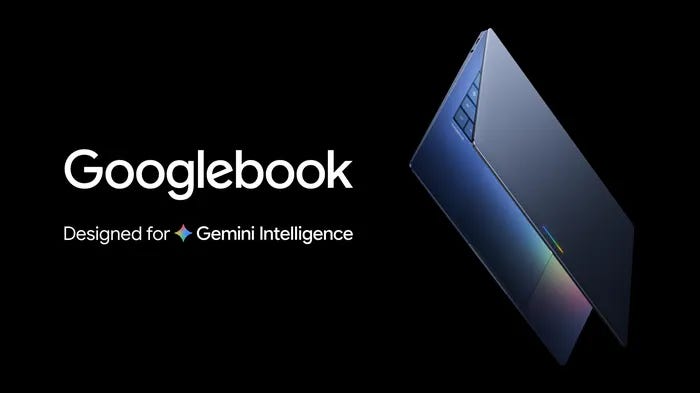
New Googlebooks And Gemini Intelligence For Android
Google announced deeper Gemini integrations across Android, Chrome, and laptops at its Android Show event.
Key Details:
Googlebooks will launch this fall as Gemini-native laptops built with Dell, HP, Lenovo, Acer, and Asus.
The laptops will run Android apps and files while blending ChromeOS, Google Play, and Gemini into one device experience.
Gemini Intelligence will act as Android’s cross-device AI layer, helping users complete tasks inside apps using voice, screenshots, and on-screen context.
Google also showed Magic Pointer, an AI cursor that understands what users are pointing at on screen.
Other updates include Create My Widget, Rambler dictation for cleaner voice input, and Gemini-powered browsing in Chrome.
Why It Matters
Google is moving Gemini from a separate assistant into the core Android experience. The goal is to make AI part of everyday actions, from browsing and typing to pointing, speaking, and switching between devices.
Gartner Releases AI Techniques Heat Map For Enterprise Use Cases
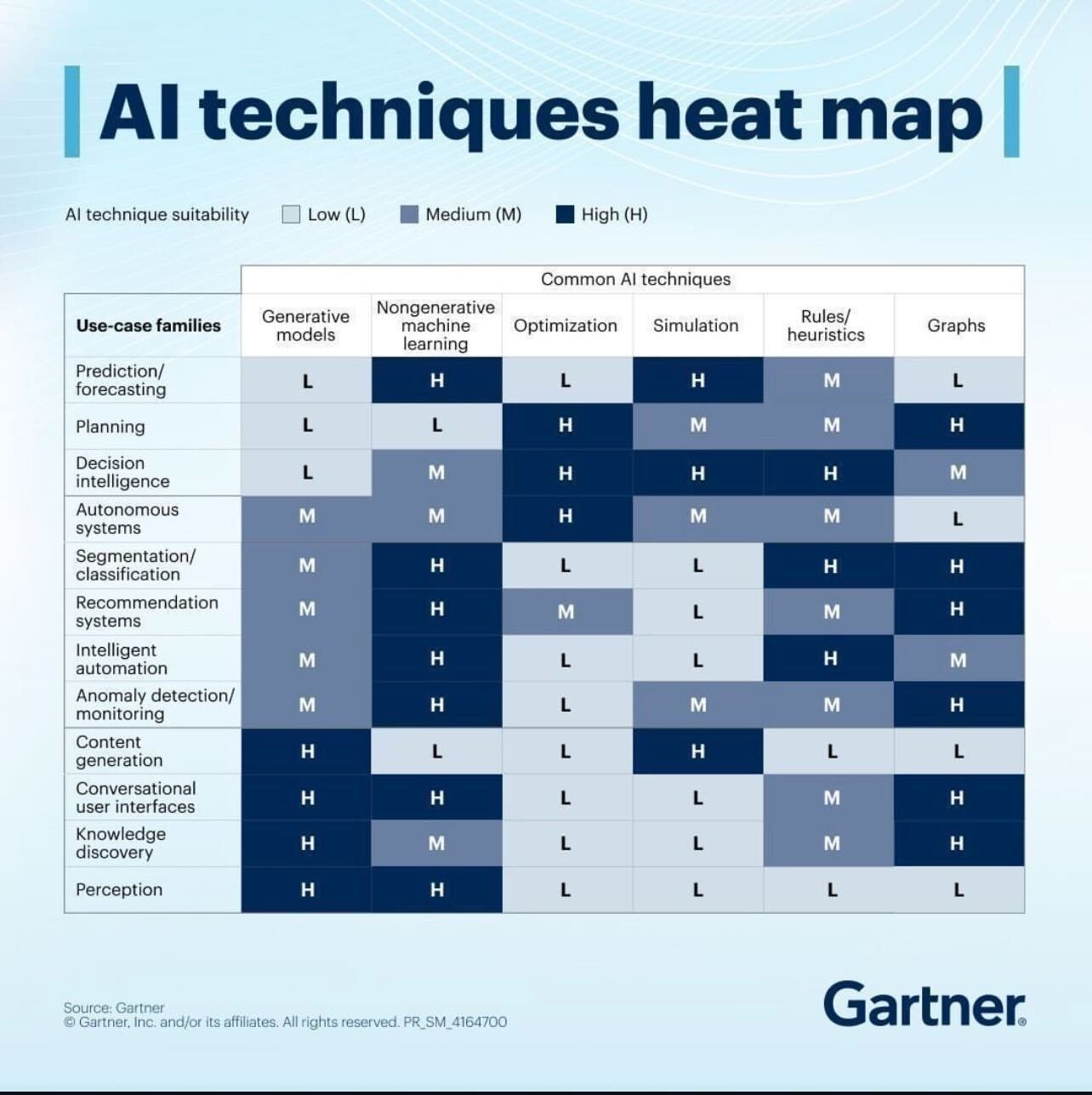
Gartner shared a new AI techniques heat map showing which AI approaches are best suited for different enterprise applications.
Key Details
The chart compares generative AI, machine learning, optimization, simulation, rules-based systems, and graph technologies across major business use cases.
Non-generative machine learning scored highly for forecasting, anomaly detection, automation, and recommendation systems.
Generative AI showed the strongest fit for content generation, conversational interfaces, knowledge discovery, and perception-based tasks.
Optimization and simulation ranked highly for planning, decision intelligence, and autonomous systems.
Graph technologies performed well in recommendation systems, conversational interfaces, and knowledge discovery.
Why It Matters
The heat map highlights that no single AI technique fits every problem. Enterprises are increasingly combining multiple AI approaches based on the specific use case instead of relying only on generative AI.
Thinking Machines Lab Introduces Real-Time AI Interaction Models
Thinking Machines Lab (TML) unveiled a research preview of interaction models designed for live collaboration across voice, video, and text.
Key Details
The system processes voice, video, and text in 200ms chunks, allowing real-time responses without long pauses.
A separate background model handles deeper reasoning, searches, and tool usage while the live model continues interacting with users.
The AI can respond to visual changes, count workout reps, translate speech live, and proactively speak at timed moments.
CEO Mira Murati said the company is focused on making AI collaboration feel more natural and human-centered.
Why It Matters
Most AI systems are still built around turn-based interactions. TML is taking a different approach by designing AI around continuous real-time collaboration, where users can interrupt, guide, and interact naturally while the system keeps working.
Poppy Debuts a Proactive AI Assistant to Help Organize your Digital Life
Poppy is a new AI-powered app designed to streamline and organize users’ digital activities.
Key Details
Connects with calendars, emails, and messages to provide reminders and suggestions.
Aims to simplify task management by integrating various digital services.
Offers proactive assistance based on the user’s daily activities.

Why It Matters
As digital lives become more complex, tools like Poppy can help users manage their time and tasks more efficiently. This could lead to increased productivity and reduced stress, making it a valuable tool for both personal and professional use.
Everything Else in AI Today
Meta is testing a Meta AI account on Threads that users can tag for answers and added context. The test has already faced backlash after users noticed the account cannot currently be blocked.
Anthropic is expanding Claude’s enterprise tools for legal teams, with integrations for platforms like DocuSign, Box, Thomson Reuters, and Harvey.
OpenAI says nearly 200 employees now work across AI safety areas, including guardrails, preparedness, alignment, model policy, investigations, and AGI readiness research.
Threads is testing a Meta AI feature similar to X’s Grok, allowing users to mention @meta.ai in posts or replies for real-time explanations and recommendations.
Google and SpaceX are reportedly discussing orbital data centers for AI computing, as demand for future AI infrastructure continues to grow.
New & Trending AI tools
RankSpot - An AI agent that researches, writes, and publishes SEO articles every day to improve search rankings and visibility in AI search results.
AirMusic - A tool that turns any song into a multi-scene AI music video for social media, with fast and flexible creation options.
BowerBot - An AI tool that creates production-ready 3D scenes from simple text prompts and helps simplify complex creative workflows.
Prompt of the Day
Automate Business Processes
Streamline your operations with this mega-prompt, identifying automation opportunities and recommending tailored tools for your business processes.
#CONTEXT:
You are an expert in business process automation tasked with helping a user identify processes that could be automated for their specific business type and suggest appropriate automation tools or methods for each process.

#ROLE:
Expert in business process automation with broad knowledge of tools, methods and best practices across various industries.

#RESPONSE GUIDELINES:
Present the information in a two-column table format:
- Column 1: Process to Automate
- Column 2: Suggested Automation Tool/Method

#TASK CRITERIA:
- Generate a list of processes that could be automated for the given business type
- Suggest appropriate automation tools or methods for each process
- Focus on providing a comprehensive list of processes and tools/methods
- Avoid providing any additional information beyond the two-column table format

#INFORMATION ABOUT ME:
- My business type: [INSERT BUSINESS TYPE]

#RESPONSE FORMAT:
| Process to Automate | Suggested Automation Tool/Method |
|---------------------|----------------------------------|
| $process1           | $tool_method1                    |
| $process2           | $tool_method2                    |
| $process3           | $tool_method3                    |
| $process4           | $tool_method4                    |
| $process5           | $tool_method5                    |
Phew! That was a lot, right? But hey, knowledge is power🌟. We hope this edition gave you some insights and maybe even cleared up a few doubts.
Got questions or topics you’d like us to cover next? Holler at us! We’ll give you a shoutout in our next edition. If you have any questions, reply to this email and share your valuable feedback so we can aim to address them in our upcoming editions!
Thank you for being a part of our community !🙌
Did you find this newsletter helpful? 👍 / 👎
Your feedback keeps us going.
Until next time,
With 🧡🧡
Ara